

ShowMe WorldCare End User Manual
Person Versions and Multiple Identities (Nicknames, Maiden Names and Aliases)
ShowMe WorldCare creates different person versions to reflect different information on the same individual.
Please be very careful when making changes to a person’s information.
- In most cases, DO NOT make changes to an existing person on the Person record as changes on the Person record will typically change that person’s information THROUGHOUT the entire system, including on earlier condition at which point the person may have had different information.
- To add multiple identities or addresses (discussed further in the next section), enter a person’s Condition or Contact record to access their multiple identities or multiple addresses screens.
To illustrate the use of person versions, an example of a nickname followed by a last name change will be used.
Susan Mattison was born February 2, 2000. When she was 20 years old, she contracted COVID in April 2020. Symptoms started on 4/16/2020. Susan tested positive on 4/17/2020 and the test result was received at DHSS.
A Person Record is entered with this name.

A COVID-19 condition record is created and displays this name.

On 4/18/2020, an investigator opens the COVID-19 condition record and contacts Susan Mattison. The patient indicates Susan is her legal first name but that she most commonly uses the nickname Suzy.
The investigator should click on the drill-down button to the right of the Age fields to open the Multiple Identities pop-up. Any existing identities are shown in the table near the top. There is currently an existing identity for Susan Mattison.
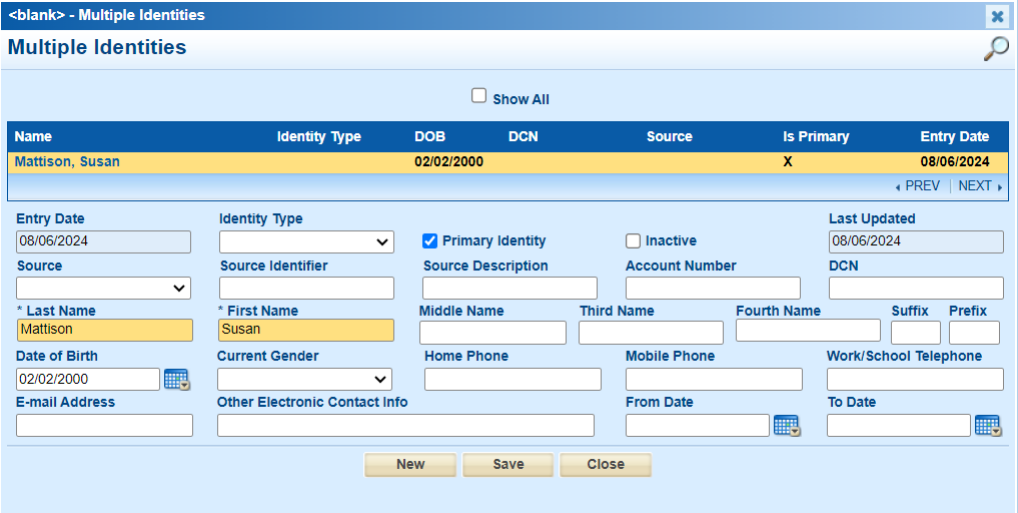
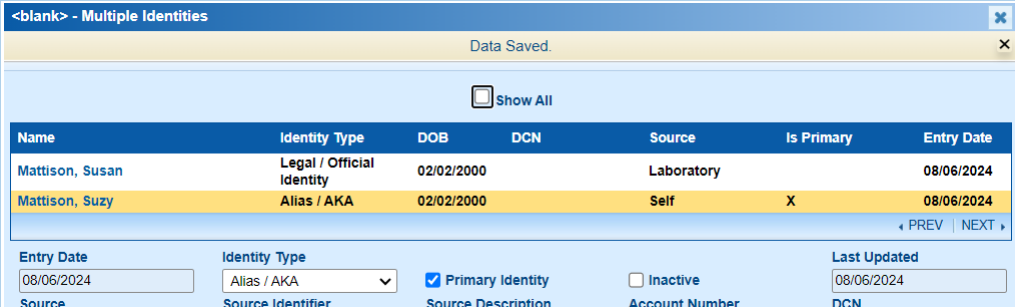
To add a new identity, click New at the bottom of the pop-up. Select an appropriate Identity Type. In this situation, Alias / AKA was selected since Suzy is a nickname. Since Susan provided this information, the Source would be Self. In the First Name field, Susan has been replaced with Suzy. Once appropriate information has been entered, the new identity can be saved. This will create a new row in the table showing the new identity has been added.
IT IS VERY IMPORTANT that the date of birth be entered on each identity as the incoming electronic record processes look for matches to the name and DOB. If the DOB is not entered on one of the identities, that will not be considered a match.

The investigator may wish to select the original identity of Susan Mattison and add an identity type for clarity. In this scenario, the patient confirms that it is her legal name so Legal / Official Identity can be selected as the identity type and the original source was a lab result so Laboratory could be selected as the result. Both identities now appear in the table.

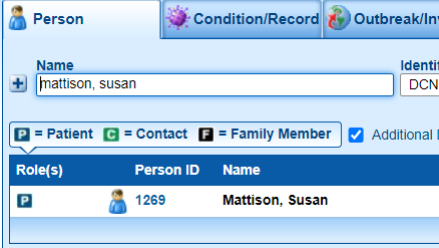
In the previous screenshot, note that Susan Mattison is marked as the Primary Identity in the Is Primary column. The primary identity will appear on the records in ShowMe WorldCare, although the nickname is also stored and searchable if the Additional Demographics box is checked on the search screen. The following screenshots illustrate that searches for both “Mattison, Susan” and “Mattison, Suzy” return the same record for Mattison, Susan, even though the name “Suzy” is not displayed as it is not the primary identity.

Since Suzy is the patient’s preference, the investigator may wish to return to the multiple identities box through the condition record and check Primary Identify on Suzy rather than Susan. Then Suzy will appear in search results and on any condition records since that is what the patient prefers to be called. Only one identify can be marked as the Primary Identify.
What would have happened if the investigator had simply changed the patient’s first name from Susan to Suzy in the First Name field on the Person record OR on the Person tab of the Condition record rather than using the multiple identities feature?
- The system would have handled the change as a correction and would not have retained a record of the legal name Susan.
- Suzy would be the only first name associated with this person and any conditions assigned to them.
- If future records were received under the name Susan, a duplicate person record may have been generated as no records would be returned when a user searched for Mattison, Susan.
- Incoming electronic messages are set to check both the primary identity and any multiple identities. Exact matches are automatically ingested into ShowMe WorldCare. Possible matches are routed to a queue where DHSS staff must manually review. This could result in delays in information being pushed into ShowMe WorldCare.
In July 2024, a woman named Suzy Hagerston contacts her local health department with some questions because she had contracted COVID-19 for the second time. The investigator searches for her name in ShowMe WorldCare but does not find her. Suzy then informs her that she may be in the system under her maiden name of Mattison but she got married on June 22, 2023.
The investigator searches for Suzy Mattison and finds her Person record. The investigator replaces the last name of “Mattison” with “Hagerston.”

When the investigator attempts to save the record, the following pop-up box appears asking if the name change should be considered a New Version, a Correction or Discarded.
- Discard will result in no change to the record.
- Correction should be used when a true correction is being made. For example, perhaps staff originally mistyped Mattison as Mattingly even though all records indicated Mattison. Choosing correction will update the name throughout the system.
- In this scenario, Suzy has had two valid names at different points in time. When she had her original COVID-19 case, her name was legally Mattison. For her second COVID-19 case, her legal name is Hagerston. Therefore, the investigator should choose New Version as this is NOT a correction but a new version of the same person.

(To review the information that has changed, click the + symbol at the left of the pop-up to view details.)

The investigator chooses New Version and saves. The investigator then saves the Person record and adds the new COVID-19 condition for July 2024.
A few days later, a different investigator receives a paper lab report on Susan Hagerston. A Person Search for “Hagerston, Susan” returns no records so the investigator broadens the search to only last name Hagerston. They have Additional Demographics checked on the search screen. The following records are returned.

Note that two names have been returned, Suzy Hagerston and Suzy Mattison. However, the Person ID column contains the same number, 1269. This is because both names are listed as different versions of the same person. If selected, both options will lead to the same Person record with the name Suzy Hagerston since is the current name.
Suzy’s Person record shows that she has had two conditions, both COVID-19.

If the earlier record with ID 1577 is selected, that condition record shows the name Suzy Mattison, as that was the patient’s name at the time of her first COVID case.

The later condition with ID 1582 shows the name Hagerston as that was the patient’s name at the time of the second COVID case.

Why didn’t the search for “Hagerston, Susan” return any records?
The answer to this question becomes clear by turning to the Multiple Identities pop-up by clicking the drilldown button to the right of the age fields within the COVID-19 condition record. When the new person version was created, it updated the primary identity, which was previously Suzy Mattison.

Since the patient’s legal name would now actually be Susan Hagerston, the investigator should add that as another identify. The patient provided their wedding date (06/22/2023) so the investigator could list that as the From Date within the new identity.

The investigator may also click on the Suzy Hagerston identity to add the from date of 06/22/203.

Notice that clicking on the Susan Mattison identity now shows that the system has changed the “To Date” field to 08/06/2024, which is the date the correction was made. This indicates that this identity should not be selected going forward as it is no longer current. The investigator could update this field to the patient’s wedding date of 06/22/2023 since that was the date of the name change.
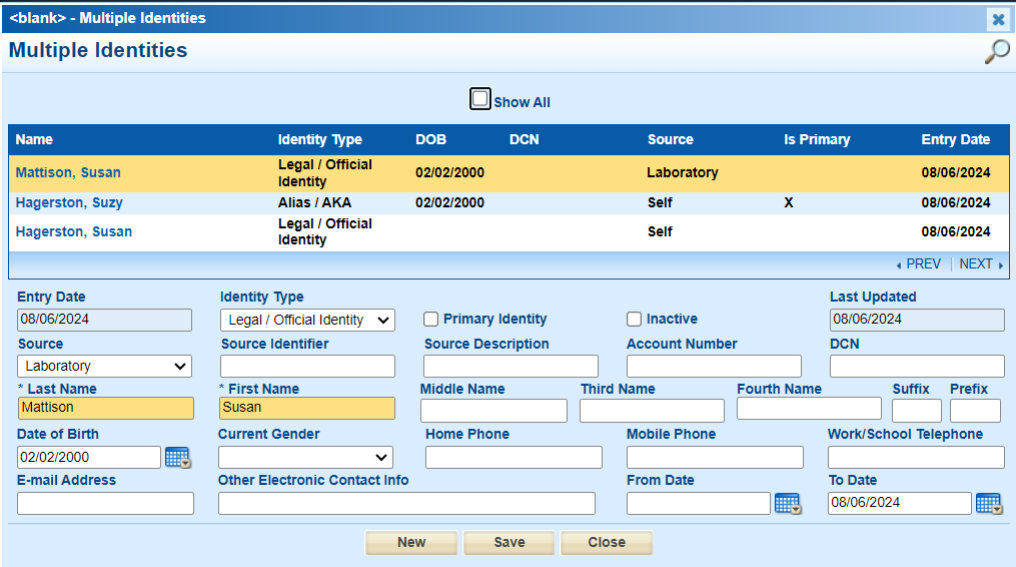
The investigator notices that there is no identity for “Suzy Mattison” but thinks it is possible someone could search for that based on the other records. To be thorough, the investigator adds a fourth identity for Suzy Mattison. Now appropriate records should be returned no matter which name combination is searched.

Before leaving the Multiple Identities box, ALWAYS VERIFY that all identities contain the DOB to allow for appropriate name/DOB searching within ShowMe WorldCare and by incoming electronic record processes.
Please Note: Additional identities can only be added conditions using the Primary identity. In the example above, selecting the older COVID condition to access the Multiple Identities box will reveal that the New button is now grayed out. To add an additional identity, the newer COVID record with the Suzy Hagerston name would need to be accessed.